Chapter 3 Connection and Resolution
This chapter contains the following sections :
Connection
Before using this dock, please ensure the host laptop has installed the latest DisplayLink Graphics Driver.
Power on Your Dock
Connect this docking station to a power outlet.
Connect to the Host
- Connect the USB-C port(host) to your laptop.
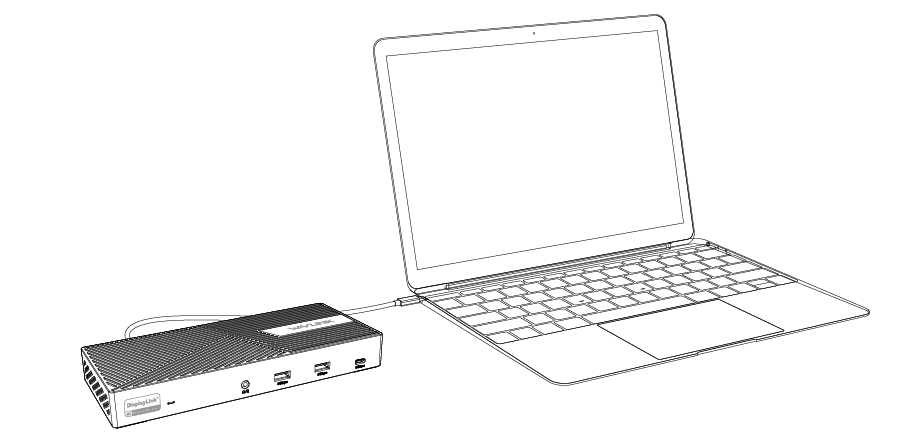 Note for Cable Holder:
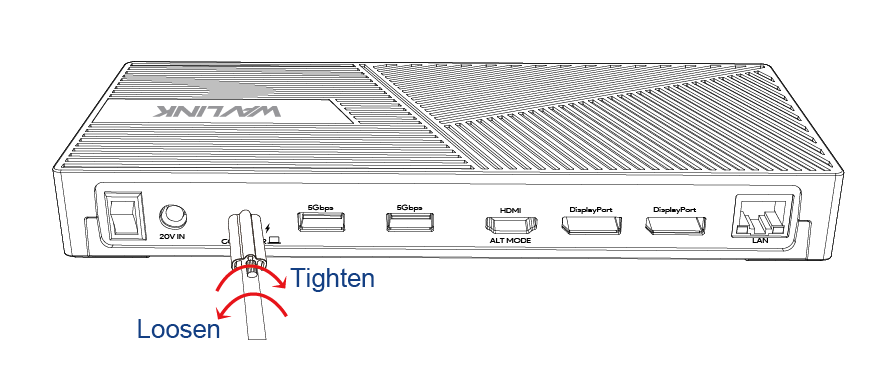
The cable holder is designed to tighten the USB-C cable. If you are worried that the USB-C cable might loosen, please follow the following steps to install the cable holder to the dock. The Cable Holder just is used for fixing the cable to prevent accidental touch and loosening. After assembling it, please do not pull it hard to avoid damage to the interface. Please follow the instructions if you need to disassemble it.
1). Insert the cable into the cable holder according to the arrow direction.
2). Align the bolt with the fixing hole, then please connect it to the host Type-C port.
 3). Fasten the bolt and fix the connectivity between the cable and the dock. Tighten the screw clockwise when you are assembling it. Please loosen the screw counter-clockwise if you need to disassemble it.
Connect to the Monitors
Connect to the external monotor, can connect up to three monitors.

Resolution
Single Display
| Display Port | Resolution |
|---|---|
| HDMI(Alt Mode) | DP1.2: 3840×2160@30Hz |
| HDMI(Alt Mode) | DP1.4: 3840×2160@60Hz |
| DisplayPort 1 | DP1.2: 3840×2160@30Hz |
| DisplayPort 1 | DP1.4: 3840×2160@60Hz |
| DisplayPort 2 | DP1.2: 3840×2160@30Hz |
| DisplayPort 2 | DP1.4: 3840×2160@60Hz |
Dual Display
| Display Port | Resolution |
|---|---|
| HDMI(Alt Mode) + DisplayPort 1/2 | DP1.2: 3840×2160 @30Hz + 3840×2160@60Hz |
| HDMI(Alt Mode) + DisplayPort 1/2 | DP1.4: Dual 3840×2160@60Hz |
| DisplayPort 1 + DisplayPort 2 | DP1.2: Dual 3840×2160@60Hz |
| DisplayPort 1 + DisplayPort 2 | DP1.4: Dual 3840×2160@60Hz |
Triple Display
| Display Port | Resolution |
|---|---|
| HDMI(Alt Mode) + DisplayPort 1 + DisplayPort 2 | DP1.2: Single 3840×2160@30Hz + Dual 3840×2160@60Hz |
| HDMI(Alt Mode) + DisplayPort 1 + DisplayPort 2 | DP1.4: Triple 3840×2160@60Hz |